The path to a rewarding career in India’s Eklavya Model Residential Schools (EMRS) system starts with a crucial digital document: your EMRS admit card 2025. For over 7,000 aspiring educators and administrative staff, this hall ticket is more than just an entry pass; it is the official key to sitting for the EMRS Staff Selection Examination (ESSE-2025). The National Education Society for Tribal Students (NESTS) has officially released the admit cards, marking the final preparatory phase for the exams scheduled for December 13, 14, and 21, 2025.
With a significant number of vacancies—spanning roles from Principal and Post Graduate Teacher (PGT) to Hostel Warden and Junior Secretariat Assistant (JSA)—the competition is understandably intense. Your first and most critical step towards success is a seamless EMRS admit card login and download process, followed by meticulous verification of all printed details.
This comprehensive guide is designed to walk you through every single step, from accessing the official portal to understanding what to do on exam day. We will demystify the login process, highlight the essential information you must verify, and provide expert-backed strategies to avoid common pitfalls. Think of this as your personal handbook, ensuring that a technical glitch or an overlooked detail doesn’t stand between you and your career aspirations in this transformative educational initiative.
The Critical Importance of the EMRS Admit Card
Your EMRS hall ticket is not a mere formality. It is a mandatory examination document sanctioned by NESTS that serves multiple vital functions. Primarily, it is your proof of registration and eligibility to appear for the ESSE-2025. Without it, you will not be granted entry into the examination centre, regardless of your application status. It acts as your official identification within the exam venue, linking your application number and personal details to the assigned exam centre location and roll number.
Beyond access, the admit card contains the personalized exam schedule specific to the post you have applied for. Given that the exam is conducted over three days with different shifts for various positions (for instance, PGT exams on the morning of December 14th, while TGTs are in the afternoon of the same day), your hall ticket provides the definitive timing you must follow. Furthermore, it carries the exam day instructions and a list of prohibited items, making it a critical resource for ensuring you comply with all official protocols and avoid unintentional disqualification.
Step-by-Step Guide to EMRS Admit Card 2025 Download and Login
The process to download your EMRS admit card 2025 is straightforward if you follow the correct sequence on the official websites. You have two primary portals for this purpose: examinationservices.nic.in or nests.tribal.gov.in. Both are legitimate and host the same login gateway for the ESSE hall ticket download.
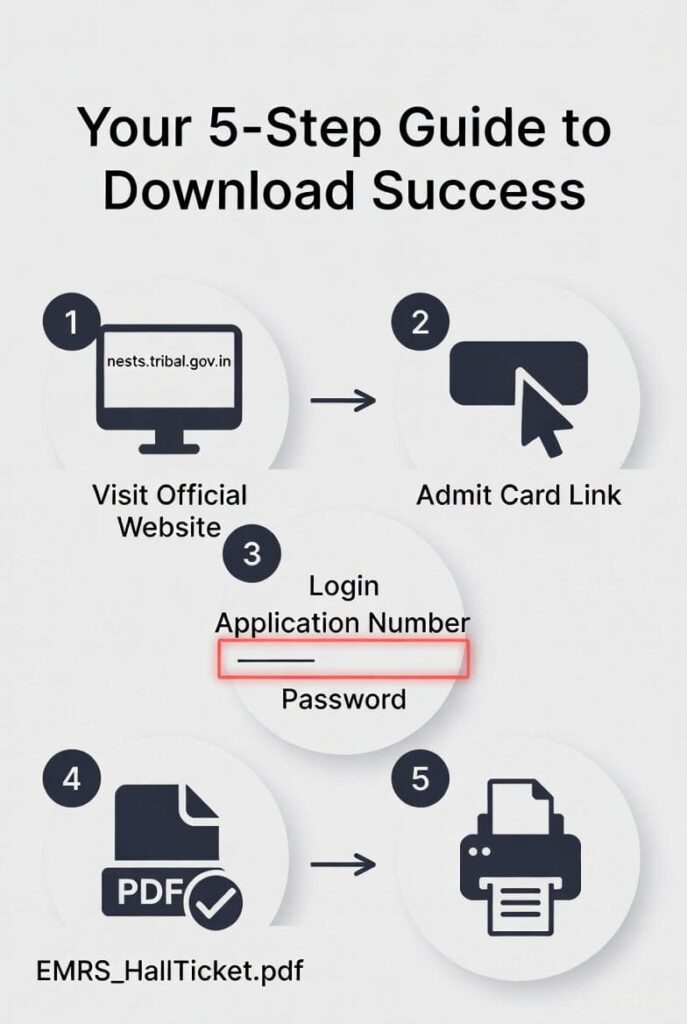
Here is a detailed, step-by-step breakdown:
- Access the Official Portal: Open your web browser and navigate to either of the official websites mentioned above. To avoid phishing sites, always double-check the URL. The homepage will prominently feature a notification or link titled “Admit Card Download Link for ESSE-2025” or “EMRS ESSE Admit Card 2025”.
- Locate and click the Admit Card Link: Click on this specific link. You will be redirected to a secure login page designed for candidate authentication.
- The EMRS Admit Card Login Process: This is the core step. You will be required to enter your login credentials to retrieve your unique admit card. According to the official notices, you typically need to input your:
- Application/Registration Number (This is the unique ID generated when you submitted your application).Password (Created during the application process) OR your Date of Birth.
- Download and Save: After successful login, your EMRS hall ticket will be displayed on the screen in PDF format. Carefully review all details first (as outlined in the next section). Then, use the download or save option to store a copy on your device.
- Print Multiple Copies: Take at least two clear printouts of the admit card on A4-size paper. Ensure the print quality is good, and all text, your photograph, and the signature/thumb impression are clearly visible. Keep one copy for the exam day and another as a backup.
A candidate’s login journey to download their EMRS admit card from the official portal.
Information You MUST Verify on Your Downloaded Admit Card
Once your admit card is downloaded, your immediate task is to scrutinize every detail. An error here could cause major issues on exam day. Do not assume all information is automatically correct. Here is a checklist of what to verify:
- Personal Details: Your full Candidate’s Name (as per your ID proof), photograph, and category (SC/ST/OBC/EWS/UR). The photo should be clearly recognizable as you.
- Examination Details: Your Roll Number, the Post Applied For (e.g., TGT – Mathematics, JSA), and the Exam Date.
- Venue Information: The complete Exam Centre Name and its full Address. It is highly advisable to look up the location on a map beforehand to plan your route.
- Timing Instructions: The Exam Shift (Morning/Afternoon) and precise Reporting Time. Most sources advise arriving at least 60 minutes before the exam starts to complete entry formalities. Late entry is generally not permitted.
- Official Signatures and Stamp: The document should bear the authorized signature and seal of NESTS.
What to Do If You Find a Discrepancy: If you spot any mismatch in your name, photo, post applied for, or exam centre, do not ignore it. You must immediately contact the examination authorities at NESTS using the helpline or email provided in the official notification. Prompt action is crucial for correction.
EMRS 2025 Exam Schedule and Post-Wise Timings
A clear understanding of the exam schedule is paramount for your preparation. The ESSE-2025 is an offline, OMR-based examination conducted across two shifts on three separate days. The timing and duration vary by post. The table below consolidates the official schedule for your quick reference:
| Exam Date | Post(s) | Exam Timings | Duration |
|---|---|---|---|
| December 13, 2025 | Principal, Accountant | 2:30 PM to 4:30 PM | 2 Hours |
| December 14, 2025 | Post Graduate Teacher (PGT) | 9:00 AM to 11:30 AM | 2.5 Hours |
| December 14, 2025 | TGT & Miscellaneous Teachers | 2:30 PM to 5:00 PM | 2.5 Hours |
| December 21, 2025 | Hostel Warden, Female Staff Nurse | 9:00 AM to 11:00 AM | 2 Hours |
| December 21, 2025 | Junior Secretariat Assistant (JSA), Lab Attendant | 2:30 PM to 4:30 PM | 2 Hours |
Crucial Takeaway: Your specific exam date and shift timing will be printed on your individual admit card. This is your single source of truth. Rely on this personalized information over any general schedule.
Exam Day Guidelines: Your Blueprint for a Smooth Experience
Being well-prepared for the day itself can significantly reduce stress and help you perform at your best. Here is a consolidated list of exam day guidelines drawn from official instructions.
Documents to Carry (The Must-Haves):
- A printed copy of your EMRS Admit Card 2025: The physical printout is mandatory. A soft copy on your phone will not be accepted.
- Original Valid Photo ID Proof: Carry the original of any one of the following: Aadhaar Card, Passport, Driving Licence, Voter ID, PAN Card. A colour printout of your Aadhaar Card is also specifically mentioned as acceptable alongside the original.
What NOT to Carry (Prohibited Items):
The list of banned items is strict to maintain the integrity of the exam. Do not carry:
- Mobile phones, smartphones, or any communication device.
- Smartwatches, calculators, or any programmable electronic gadget.
- Bluetooth devices, earphones, or microphones.
- No bags, wallets, or valuable items.
It is safer to leave such items at home or with an accompanying person, as carrying them may be treated as a violation of exam rules, leading to disqualification.
Final Preparations Before You Leave:
- Plan Your Journey: Use the day before the exam to locate your centre. Account for potential traffic, weather, or public transport delays. Aim to arrive 60-90 minutes early.
- Dress Comfortably: Choose simple, comfortable clothing. Avoid garments with large pockets or metal accessories that might slow down security checks.
- Carry Essentials: A transparent water bottle and a simple black/blue ballpoint pen (as it’s an OMR-based test) are recommended.
Troubleshooting Common Login and Download Issues
Even with clear instructions, candidates sometimes face hurdles. Here’s how to tackle common problems during the EMRS admit card login:
- “Invalid Credentials” Error: This is the most common issue. First, ensure Caps Lock is off. Re-enter your Application Number and Password carefully. If you’ve forgotten your password, look for a “Forgot Password” link on the login page, which typically uses your registered mobile number or email for recovery.
- Page Not Loading or Website Crash: High traffic on the day of release can slow down or crash websites. Be patient and try refreshing after some time. Alternatively, use the other official website (
emrs.tribal.gov.inifnests.tribal.gov.inis not working, or vice-versa). Try accessing the site during late evening or early morning hours when traffic is lower. - Photograph/Signature Not Visible: If the admit card downloads, but the photo is missing or unclear, try downloading the PDF again. If the problem persists, contact the helpline immediately, as an admit card without a clear photo may be rejected at the centre.
- Details are Incorrect: As stressed earlier, report any discrepancy in personal or exam details to NESTS authorities at once via their official contact channels. Do not attempt to modify the PDF yourself.
Beyond the Admit Card: The Road Ahead in the EMRS Selection Process
While the admit card is your ticket to the first hurdle, understanding the full EMRS recruitment 2025 selection process is essential for long-term preparation. The selection for these coveted posts is multi-staged and rigorous:
- Written Examination (Tier-I): This is the stage for which the admit card has been released. It is the screening test that candidates must clear to advance.
- Skill Test: For certain posts like Junior Secretariat Assistant (JSA), a skill test (e.g., typing test) will be conducted for those who qualify in the written exam.
- Interview: Shortlisted candidates from the written exam (and skill test where applicable) will be called for a personal interview to assess their suitability for the role.
- Document Verification: The final stage involves the physical verification of all original educational certificates, experience documents, caste/category certificates, and other relevant paperwork.
Your EMRS hall ticket is the key that unlocks this entire journey. Performing well in the upcoming exam sets the foundation for your progression through these subsequent stages.
Conclusion: Your Gateway to a Fulfilling Career Awaits
The release of the EMRS admit card 2025 marks the transition from the application phase to the action phase. By now, you should feel confident about navigating the EMRS admit card login and download process, verifying all critical information, and preparing effectively for exam day. Remember, this hall ticket is a foundational document—treat it with the importance it deserves. Download it early, check it thoroughly, and follow the guidelines meticulously.
As you prepare to take this significant step towards a career dedicated to empowering tribal education through the Eklavya Model Residential Schools system, keep your focus sharp. Plan your travel, organize your documents, and walk into the examination centre with the confidence that comes from being thoroughly prepared. We wish you the very best of luck for the EMRS Staff Selection Examination 2025 and for a successful career ahead
Read More: Nainital Bank Recruitment 2025–2026: Apply Online for Clerical & Officer Posts (Direct Link)